Setting Up Monerod For a Private Remote Node
In this post I will document how to run a basic Monero node on a Linux server.
My preferred distribution is Debian and this guide will assume you are running it also, but the steps are similar for other linux distributions and Operating Systems.
A Failure Turned Into Success - My Story
For this setup I am using a Raspberry Pi 4B (4GB).
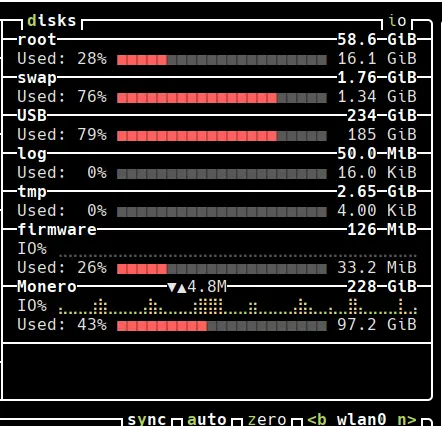
Initially I thought I would be able to sync the monero blockchain to a USB 3.0 flash drive, however after a month it had only reached around 30% with little progress.
I decided to try something different - Using an external SSD, I setup the drive with a 250 GB partition formatted as EXT4.
After roughly 4 days on a 50MBps down / 10BMBps up connection: I was fully synced and ready to go. Work together with me as we connect to the monero network.
Why run your own Monero node?
tl;dr Running your own Monero node gives you privacy, security, and sovereignty over your transactions.
Privacy
When you use someone else’s node (a remote node), that operator can log your IP address, see which transactions you’re querying, and potentially link your wallet activity to your identity. Your own node means you verify everything yourself — no third party learns anything about your financial activity.
Security
Remote nodes can serve you manipulated data — false balances, fake transaction confirmations, or withheld transactions. A malicious node could deceive your wallet. Your own node independently validates every block and transaction against consensus rules, so you know the data is correct. This is especially critical given Monero’s privacy model: if your node is compromised, much of the obfuscation from ring signatures and stealth addresses can be partially undermined at the metadata level.
Network Health
Every node strengthens the decentralization and resilience of the Monero network. More nodes make it harder to attack, censor, or shut down the network.
Setting Up a Firewall First
Before making any additional steps ensure that your system is hardened with at minimum an internal firewall. In this example we will use a FOSS (Free and Open Source Software) known as UFW (Uncomplicated Firewall).
Using your terminal of choice, install the software from your linux distribution’s package manager:
sudo apt install ufwRun the following commands to add some basic UFW rules and enable the firewall:
UFW Steps
- Deny by default all incoming connections while retaining outgoing traffic.
sudo ufw default deny incoming
sudo ufw default allow outgoing- Limit SSH access
sudo ufw limit ssh- Allow monerod clearnet p2p port
sudo ufw allow 18080/tcp- Allow monerod clearnet restricted RPC port
sudo ufw allow 18089/tcp- Enable UFW
sudo ufw enableDownload Monero
After finishing the UFW setup, the next step is to acquire a copy of the monerod binary.
Download the appropriate version for your architecture and extract the tar.bz2 file.
Monero CLI Example
- Download Monero (Arm64 example)
curl https://downloads.getmonero.org/cli/linuxarm8 -L -OObtain Hashes: https://www.getmonero.org/downloads/hashes.txt
Verify Hash
echo d38c9ef8ee1a5d2de32f67d2f46c767c0c5cc3bb23ba7e3dfa9cbb19ceb2c84c linuxarm8 | sha256sum -cIf the hash is OK proceed, if not re-download the file.
- Extract tar file
tar -xvf linuxarm8- Enter Directory (version might change)
cd monero-aarch64-linux-gnu-v0.18.4.6/!! Optional but Important !!
If you do not have sufficient disk space to store the full/pruned blockchain, you will have to set a symlink for your data.mdb file. (Monero blockchain database)
ln -s ~/.bitmonero/lmdb/data.mbd /path/to/external/drive- Run the following command in terminal:
monerod --prune-blockchain --sync-pruned-blocksNotice: The above command will lock your terminal window to monerod so ensure you use –detach, tmux, or && afterwards to avoid having to SIGINT your session.
That is it. Your progress will appear as the following:
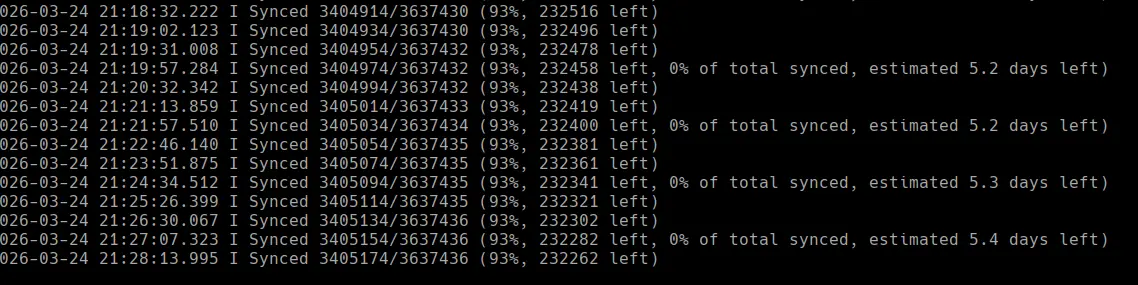
You will have to allow for the blockchain to be fully synchronized before being able to use your new remote node.
Limitations and room for improvements:
We plan on returning to this topic with alternative methods to better provide increased security, customization, and management by implementing systemd support as well as support for I2P/Tor. In addition we will demonstrate on how to use RPC to manage the monerod daemon, Additionally I have moved onto implementing Nix in my workflow and would like to share that as well.
References: